





Home Representatives


Market Central SwitchCenter


This is the resource page for the Market Central SwitchCenter gang switch desktop control application.

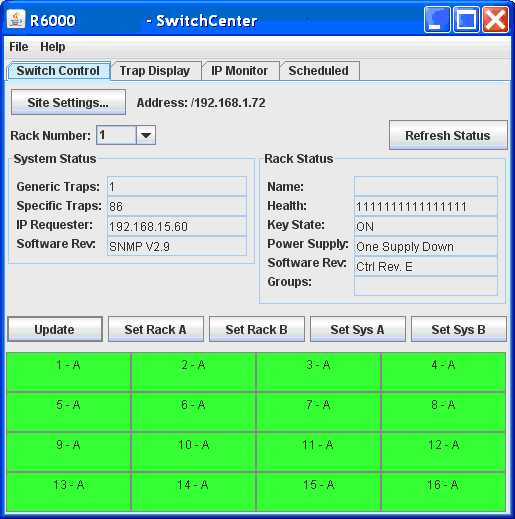
Market Central SwitchCenter software is a JAVA based desktop application which allows the control and monitoring of a Market Central gang switching system. It is compatible with gang switch models R1000, R5000, and R6000. With SwitchCenter you can:

  • control switches at the card, rack, and system levels
  • monitor system health status; power supplies, key switch
  • display event traps from one or more systems
  • monitor IP addresses and switch in response to communication loss
  • set scheduled one time or repeating switching actions

    Installation:

    Market Central SwitchCenter software requires a computer running the Java 2 Platform, Standard Edition (J2SE). The minimum J2SE version required for SwitchCenter version 1.x is release 1.4 (the current release as of this document is 1.4.2).

    To install J2SE go to the Sun website http://java.sun.com/j2se/index.jsp and follow the link under Popular Downloads in the Related Links section for J2SE. On the download page you need to download the Java Runtime Engine (JRE) for the appropriate operating system. Follow the Sun provided Installation Instructions to complete J2SE installation on your system.

    After successfully downloading and installing the J2SE package, you will need to download and setup the SwitchCenter application.

    The SwitchCenter Application is delivered as a single JAVA ARchive (JAR) file which you can download below. Use the Save As feature of your browser to download the file. For MS IE right-click the download link below, and select Save Target As. Browse to a suitable location on your system and click Save. In the same way you can download the supplied batch file to run the application in Windows.

    You may need to edit the batch file if the location of your Java runtime files are not at the default location (or later version). Change the path "C:\Program Files\Java\j2re1.4.2_03\bin" to the location that your Java runtime files are located.

    You can then start SwitchCenter in the following ways.

      Open a DOS Command prompt, navigate to the directory containing mcsc1_1.jar and the batch file, and enter mcsc (running the batch file).

      From the taskbar select start -> Run... and enter the path and name of the batch file.

      Create a shortcut to the batch file. Be sure to set the working directory to the directory of the Jar file, and if desired select run minimized to hide the Command window that launches the batch file.

      Create a shortcut to directly run the application. To do this set the following command as the Target or Program:

      "C:\Program Files\Java\j2re1.4.2_03\bin\javaw.exe" -cp mcsc1_1.jar switchcenter.Application

      Be sure to set the working directory to the directory of the Jar file.


    Download mcsc1_1.jar here
    Download mcsc.bat here
    Download SwitchCenter user manual here


    For Additional Information, Ordering, and Technical Help 8AM to 5PM EST please contact us.

  • For More Information Contact:

    Market Central Inc.
    500 Business Center Drive, Pittsburgh, PA 15205
    Tel: 412.494.2800
    FAX: 412.494.5550
    Internet: info@secureswitch.com


    Home Representatives

    Copyright © 2009 Market Central Inc.